

Is the native Divi Map module too limited for your needs? Let’s dive into the feature-packed plugin Supreme Maps Pro from the guys at Divi Supreme.
Here’s a complete walkthrough of Supreme Maps Pro. Enjoy!
Summary: Supreme Maps Pro For Divi
Supreme Maps Pro is a premium Divi plugin that adds two new modules:
- The Leaflet Maps Module that is a featherweight alternative for ultrafast pagespeed. And it doesn’t require a Google API key.
- The Google Maps Module has a wide array of advanced features like Marker Clustering, Custom Marker Icon, Customizable Pop Up Options and extensive design settings including six different Map Styles.
More map modules will come in future updates. Next in line is a Bing Map module. The maps loads fast thanks to slim code and performance boosters like Dynamic CSS and Dynamic JS.
Plugin Features
- Add Leaflet Maps with or without a Google Maps API key
- Add Google Maps with far more features and design options then the default Divi Map Module
- Choose between six preset map styles or add your own JSON style
- Show location information on hover or click
- Add unlimited markers with custom marker images or choose from hundreds of icons
- Enable Marker Clustering if you use many markers
- Style and customize different Marker Pop Ups or trigger iFrames, Divi Library design, videos, images or custom links
- Style or hide default map elements like zoom control, scale control and map type control.
- … and much more.
Pricing & License
Enter the discount code DIVIMUNDO in the checkout to get 10% off.
Personal: $19.00 $17.10 for 1 year on 1 website.
Professional: $39.00 $35.10 for 1 year on unlimited websites.
Agency: $79.00 $71.10 for life-time on unlimited websites.
All modules and features + support and automatic updates are included. You can also try the free lightweight version Divi Supreme Maps. Both plugins are developed by Divi Supreme.
Installing the plugin
- Purchase Supreme Maps Pro at Divi Supreme
Enter the code DIVIMUNDO in the checkout for 10% discount - Download the plugin ZIP file
- Log in to your WordPress dashboard
- Go to Plugins » Add new and click Upload Plugin
- Upload and activate the plugin.
- You will now be asked to install the Supreme Maps Lite version as well. Go ahead and activate it.
That’s it. You should now see Supreme Maps in the WordPress dashboard menu.

Add your license key
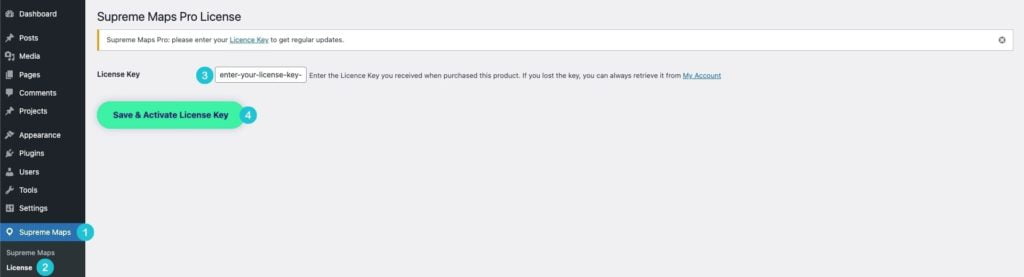
- From your WodPress dashboard, go to Supreme Maps » License
- Add your license key in the field License Key and click Save & Activate License Key
Now you have access to automatic plugin updates.
The New Supreme Map Modules
You will now find two new modules in the Divi Builder: Google Map and Leaflet Map. Watch the video above for a full walkthrough of all the features. We’ll start with the featherweight Leaflet Map.

1. The Leaflet Map Is Light As Feather
Leaflet is an open-source JavaScript library for responsive interactive maps. It’s mostly known by developers but Supreme Maps Pro makes it available for everyone by integrating it with the user-friendly Divi Builder.
There are two reasons to choose a Leaflet map over a Google map:
- Leaflet is super lightweight with just 39 kb of JS. That equals the weight of a small photo. If if you are dead serious about pagespeed, this is the option for you.
- You don’t need a Google Maps API key which really can be a hassle to configure these days. With that said, Supreme Maps Pro gives you the option to add one if you don’t want to add markers using coordinates.
Even though there are plenty of features and settings in the Leaflet Map module, you will find more advanced options in the Google Map module.
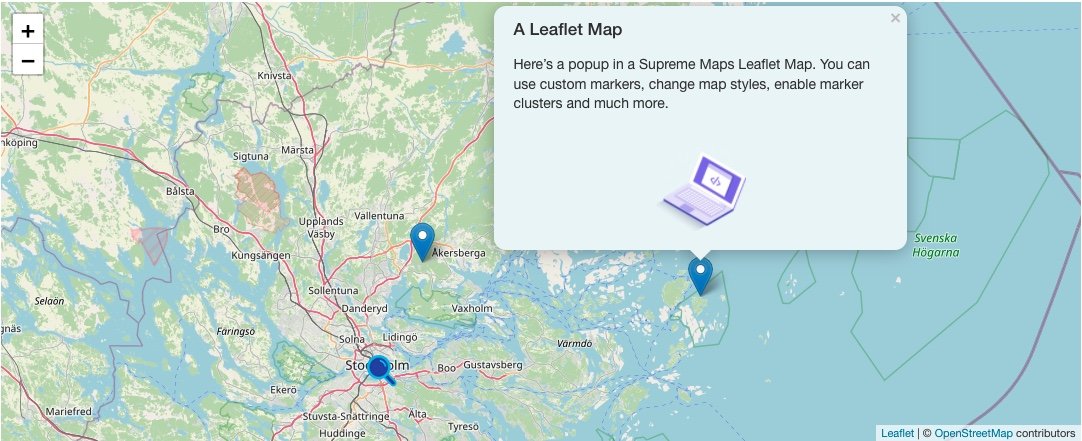
Example of a Leaflet Map created with Supreme Maps Pro.
2. The Google Map Is Packed With Features And Design Settings
The Google Map module has everything that the native Divi Map module has (unlimited markers, all the Divi design settings etc.) and much, much more. Here are a few of my favorite features:
- You can easily add custom marker images or choose from hundreds of icons (Font Awesome and Divi icons)
- Choose between 6 preset map styles – or create a unique style with JSON (advanced)
- Style the popups in detail including “open all”, hover or click triggers and opening animations
- Trigger iFrames, videos, images, Divi library layouts or custom links on marker click
- Enable marker clusters and tweak the settings
… and much more. Watch the video to see the complete list of features.

Example of a Google Map created with Supreme Maps Pro. In the middle you can see a marker cluster with three markers.

Another example of a Google Map created with Supreme Maps Pro. Choose from six different map styles or create your custom style using JSON.
What about pagespeed?
Pagespeed is more important then ever given impatient users and the Google Web Core Vitals updates.
Supreme Maps Pro only loads the JavaScript needed when a map is loaded. You can also enable Dynamic CSS in the plugin settings. The map CSS files related to Supreme Maps Module will only be loaded when they are needed on a page or a post. This means no bloat and fast loading times.

Only load CSS files related to Supreme Maps Module when they are needed on the page. This removes CSS files from the main bundle and improves load times.
Final words
If you tried the Divi Supreme Pro plugin, you know that you get extensive design options, all the features you need and a slim code base. You’ll also get regular updated and really good support when needed. The same goes for Supreme Maps Pro.
This is by far the most powerful map solution for Divi. I can highly recommend it.
👉 Related content: Design a stunning Contact page with Divi
👉 Free course: Create a Divi website from scratch




I’ve installed the Leaflet map on a page for a client. They’ve change since you created this post. There is no place to enter a license code. Perhaps that’s because I bought mine from the Elegant Themes marketplace rather than directly. (Sorry, I only discovered this post after purchasing.)
The issue I’m facing is that the map’s pop-ups don’t work on the Safari browser on a Mac. Oddly enough they do on Safari on the iPhone and iPad. I use PC’s and since Apple no longer creates a Windows version, I didn’t catch the issue, my client did. I’ve contacted support and it looks like it’s not a global issue rather than a problem with my build. Hopefully they get this fixed soon.
Thanks for the heads up Bill! I’ve notified the developer.