
Divi Background Video Settings
The Divi Video Pro plugin adds video services and Dynamic Content to Divi’s own background video settings, in every section, row, column and module.
On this page
- Turning it on
- Adding a background video
- YouTube
- Vimeo
- Video files
- A different video on every post
- While the video loads
- Pausing
- In the Visual Builder
- Phones and reduced motion
- Speed and privacy
- Good to know
Turning it on
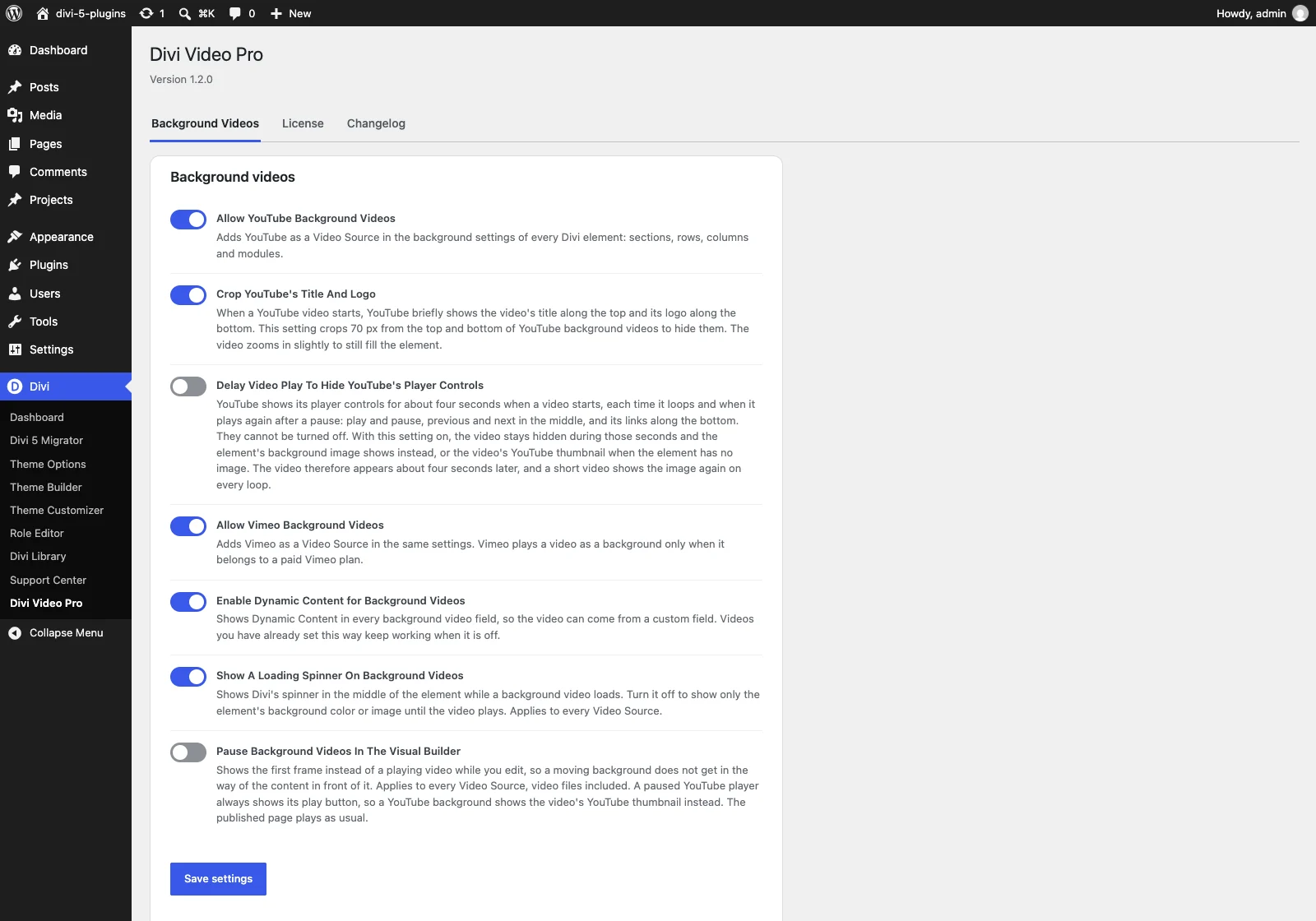
Background videos work from the moment the plugin is active. The settings are under Divi > Divi Video Pro > Background Videos, one toggle each:
- Allow YouTube Background Videos (on): adds YouTube as a Video Source.
- Crop YouTube’s Title And Logo (on): crops the bars YouTube shows along the top and bottom of the player. See YouTube.
- Delay Video Play To Hide YouTube’s Player Controls (off): waits until YouTube’s controls have gone before the video shows. See YouTube.
- Allow Vimeo Background Videos (on): adds Vimeo as a Video Source.
- Enable Dynamic Content for Background Videos (on): lets every background video field take its video from a custom field.
- Show A Loading Spinner On Background Videos (on): Divi’s spinner in the middle of the element while the video loads.
- Pause Background Videos In The Visual Builder (off): keeps the canvas still while you edit.
Adding a background video
Open the settings of a section, row, column or module, go to Background and choose the Video tab. Video Source decides where the video comes from:
- Video File is Divi’s own background video, with an MP4 file and a WEBM file if you like. It’s the default, so the backgrounds you already have stay as they are.
- YouTube takes a link to a YouTube video.
- Vimeo takes a link to a Vimeo video.
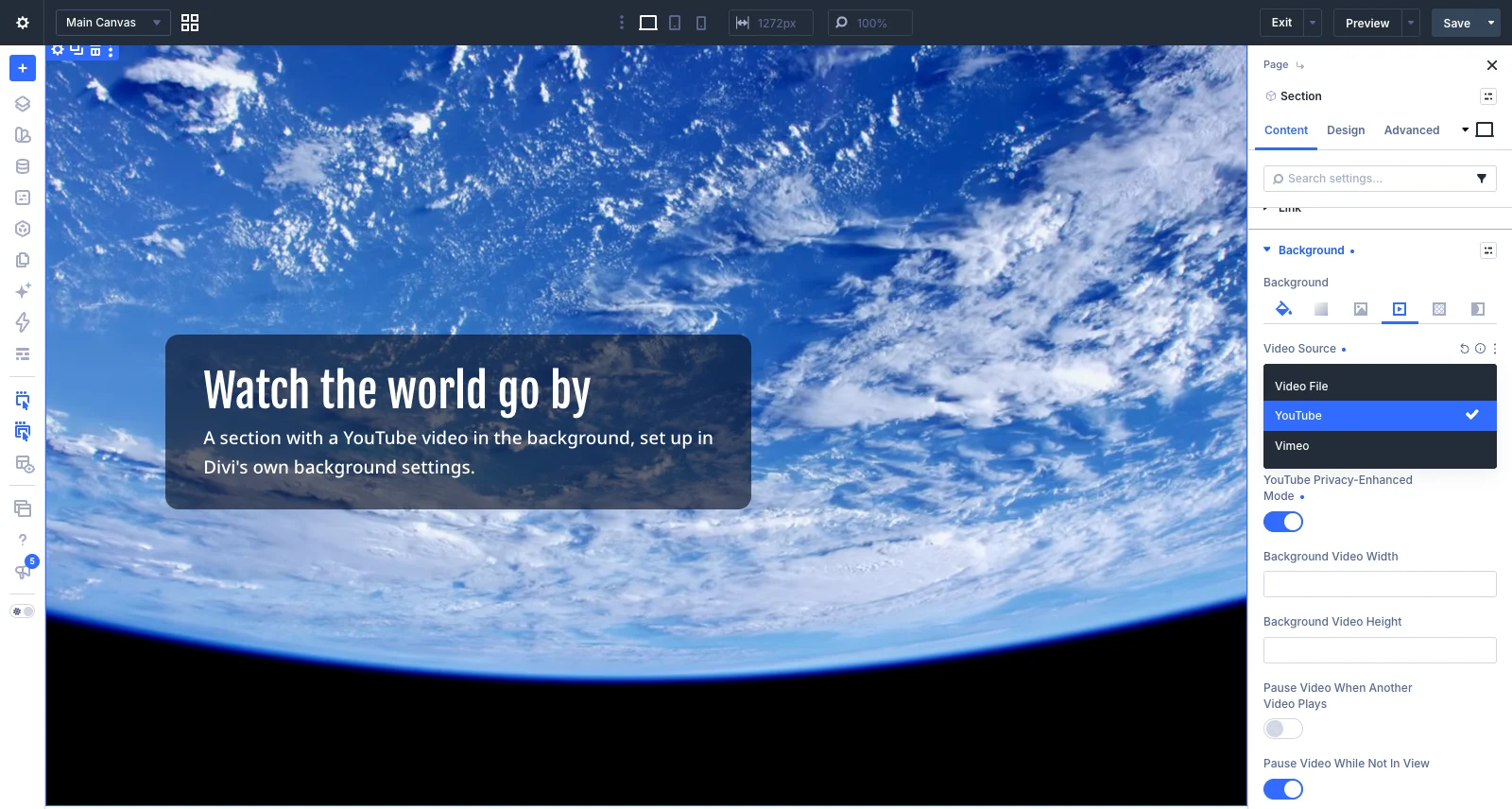
The video plays muted, in a loop and without controls, and covers the element the same way Divi’s own background video does: as large as needed, centered, cropped at the edges. The element’s text and modules stay on top. The element’s background color, gradient and image sit under the video and show until it plays. Divi’s background pattern and mask sit on top of it, so you can use them to tone the video down.
The source is one setting for every screen size. Background videos have no sound.
YouTube
Paste the link from the address bar or from YouTube’s Share button. Shorts and live stream links work too. Turn on YouTube Privacy-Enhanced Mode to load the video from youtube-nocookie.com.
YouTube shows the video’s title along the top of the player and its logo along the bottom when the video starts. Crop YouTube’s Title And Logo crops 70 px from the top and bottom of the player, so both stay out of sight. The video zooms in slightly to still fill the element.
YouTube also shows its player controls for about four seconds when the video starts, each time it loops and when it plays again after a pause: play and pause, previous and next in the middle of the video, and its links along the bottom. No YouTube setting removes them, and they sit in the middle, so they can’t be cropped. You choose how to handle them:
- With Delay Video Play To Hide YouTube’s Player Controls off (the default), the video shows as soon as it plays, about a second after the page opens, and the controls show for a moment.
- With it on, the video stays hidden during those seconds, and the element’s background image shows instead. When the element has no background image, the video’s YouTube thumbnail shows. The video then appears about four seconds later, and a short video shows the image again on every loop.
The thumbnail is chosen on YouTube and often has text on it, so a background image of your own usually looks better. A screenshot of the video’s first frame makes the change to the video almost invisible.
Vimeo
Paste the link. Unlisted videos work too, with the full link including the code at the end. Turn on Vimeo Do Not Track to keep the player from collecting session and analytics data.
Vimeo only plays a video as a background when the video belongs to a paid Vimeo plan. Vimeo’s background player has no controls or title, so nothing needs to be cropped or hidden.
If the player can’t play a video on a device, the element’s background shows instead of an error message. A few Vimeo videos don’t play on iPhone at all, not even in an ordinary Vimeo player. If yours is one of them, try another video, or open the video on Vimeo on that phone to check.
Video files
Video File is Divi’s own background video, which works as it always has. Divi Video Pro adds Dynamic Content to its MP4 and WEBM fields, so the file can come from a custom field too (see below).
A different video on every post
Every background video field accepts Divi’s Dynamic Content, whichever Video Source you choose. Hover the field and click the Dynamic Content icon to take the value from a custom field, for example one made with Advanced Custom Fields. A Theme Builder template can then show a different background video on every post.
A link to a video on a video service also works in the MP4 field with Video Source set to Video File. The plugin recognizes the link and plays the video from that service, so one custom field can hold a link on some posts and a file on others.
Enable Dynamic Content for Background Videos controls whether the Dynamic Content icon shows in these fields. Videos you have already set this way keep working when it’s off.
While the video loads
Until the video plays, the element shows its background color, gradient and image, with Divi’s own loading spinner in the middle. The video fades in when it plays. To show only the background, turn off Show A Loading Spinner On Background Videos. It applies to video files too.
Pausing
Divi’s own Pause Video While Not In View (on by default) and Pause Video When Another Video Plays (off by default), at the bottom of the Video tab, work for every Video Source.
- Pause Video While Not In View pauses the video when it scrolls out of view and carries on when it comes back.
- Pause Video When Another Video Plays pauses it while another video on the page plays with sound, such as a Video Pro module, and carries on afterwards. A muted video, like a Silent Preview, doesn’t count.
A paused YouTube video is hidden until it plays again, since YouTube shows its controls while paused. The element’s background shows meanwhile.
In the Visual Builder
The background video plays in the canvas as you edit, and changes show straight away. A Dynamic Content field shows the video from the custom field of the page you’re editing.
A moving background can get in the way of the content in front of it. With Pause Background Videos In The Visual Builder on, the canvas shows the video’s first frame instead. A paused YouTube player always shows its play button, so a YouTube background shows the video’s YouTube thumbnail in the builder instead. The published page plays as usual.
Phones and reduced motion
Background videos play on phones and tablets, inside the page and muted. A phone or browser can still choose not to start video by itself, for example in Low Power Mode or because of a setting in the browser. The element’s background then shows, without a play button.
Visitors who have asked their device for reduced motion see the element’s background color or image instead of a video from a video service.
Speed and privacy
- The background video’s styles and its small script are only added to pages that have a background video from a video service.
- A background video further down the page loads when the visitor scrolls close to it.
- Unlike the Video Pro module, a background video can’t wait for a click: it loads the video service’s player when it comes into view. For YouTube, Privacy-Enhanced Mode avoids YouTube’s cookies. For Vimeo, Do Not Track keeps Vimeo from collecting session and analytics data. Whether you need consent for embedded video depends on your site and your country.
Good to know
- Vimeo plays a background video only when the video belongs to a paid Vimeo plan.
- YouTube shows its player controls for a few seconds at the start, on every loop and after a pause, unless Delay Video Play To Hide YouTube’s Player Controls is on.
- The source is one setting for all screen sizes, and background videos have no sound.
Back to the Divi Video Pro documentation. Didn’t find your answer? See the questions below, or contact support.
FAQ
What's the difference between the annual and the lifetime license?
Can I use Divi Video Pro on client websites?
What happens when an annual license expires?
Is there a money-back guarantee?
I usually buy on the Divi Marketplace. Should I buy there instead?
Do you add VAT?
Why doesn't autoplay start on my device?
Usually it's a setting on the device, not on your site. Browsers only allow autoplay without sound, so Divi Video Pro always starts an autoplaying video muted. Even then, the device or browser can stop it:
- iPhone and iPad block autoplay when Low Power Mode is on.
- Some phones and browsers block it when data saving or battery saving is on.
- Safari and Firefox have a setting that stops autoplay on all websites or on one site.
- If the device is set to reduce motion and Respect Reduced Motion is on in the module, autoplay is skipped on purpose.
The video then waits for a tap or click instead, so visitors can still start it. To see autoplay work, turn off Low Power Mode or try another device. If the video doesn't start on any device, check that Start Autoplay When In View or Delay Autoplay isn't making it wait, and clear your caches.
