

To open a Divi menu link in a new tab is a good choice for social media links and other external links. Opening email links, file links and click-to-call links in a new tab is also a good habit for the user experience.
Join +5 230 subscribers!
Opening Divi menu links in a new tab, step by step
- Start in your WordPress dashboard
- Header over to Appearance » Menus
- Click the Screen Options ▼ dropdown in the the right corner.

- Make sure that the Link Target checkbox under the Show advanced menu properties heading is checked.

- Scroll down to your Menu structure and click the down arrow icon ▼ to the right of the menu link that you want to open in a new tab.
- Make sure that the checkbox Open link in a new tab is checked.

- Click the Save Menu button in the bottom right corner.


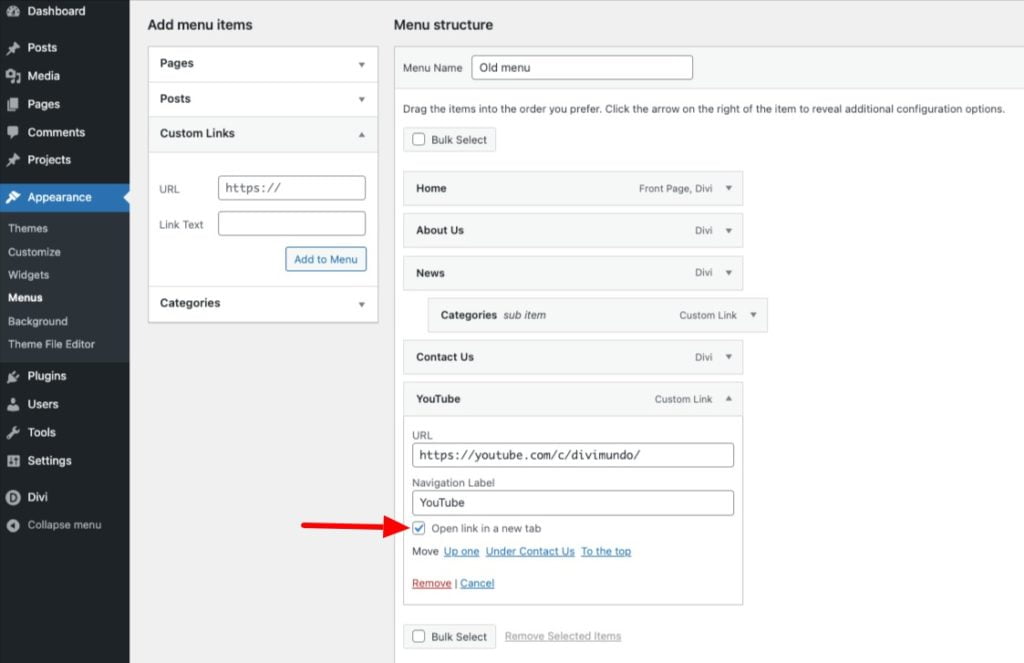
That’s it! Preview your menu in frontend and clear your browser cache and website cache if the link doesn’t open in a new tab.
When is it right to open website links in a new tab?
There’s been a long-lived debate in the UX community about opening links in a new tab. Some UX experts recommend against website links opening in a new tab – at all. Here are the pros and cons summarized:
Advantages using new tabs links
- The visitor doesn’t leave your website
- The difference between your content and external content becomes very clear for the visitor
- Most people are used to external links opening in a new tab.
Disadvantages using new tabs links
- New tabs can be confusing for mobile users.
- The back button stops working
- Additional tabs consume more device resources
- Some users prefer to decide for themselves if links should be opened in a new tab.
That’s all for today!
I hope that you enjoyed this post. Subscribe to VictorDuse.com on YouTube and join our Facebook group for more crisp content on WordPress and web design.
👉 Related post: Six Tips For A Better Mobile Menu In Divi
👉 Free course: Create a website from scratch with Divi




0 Comments